Today, at a glance.
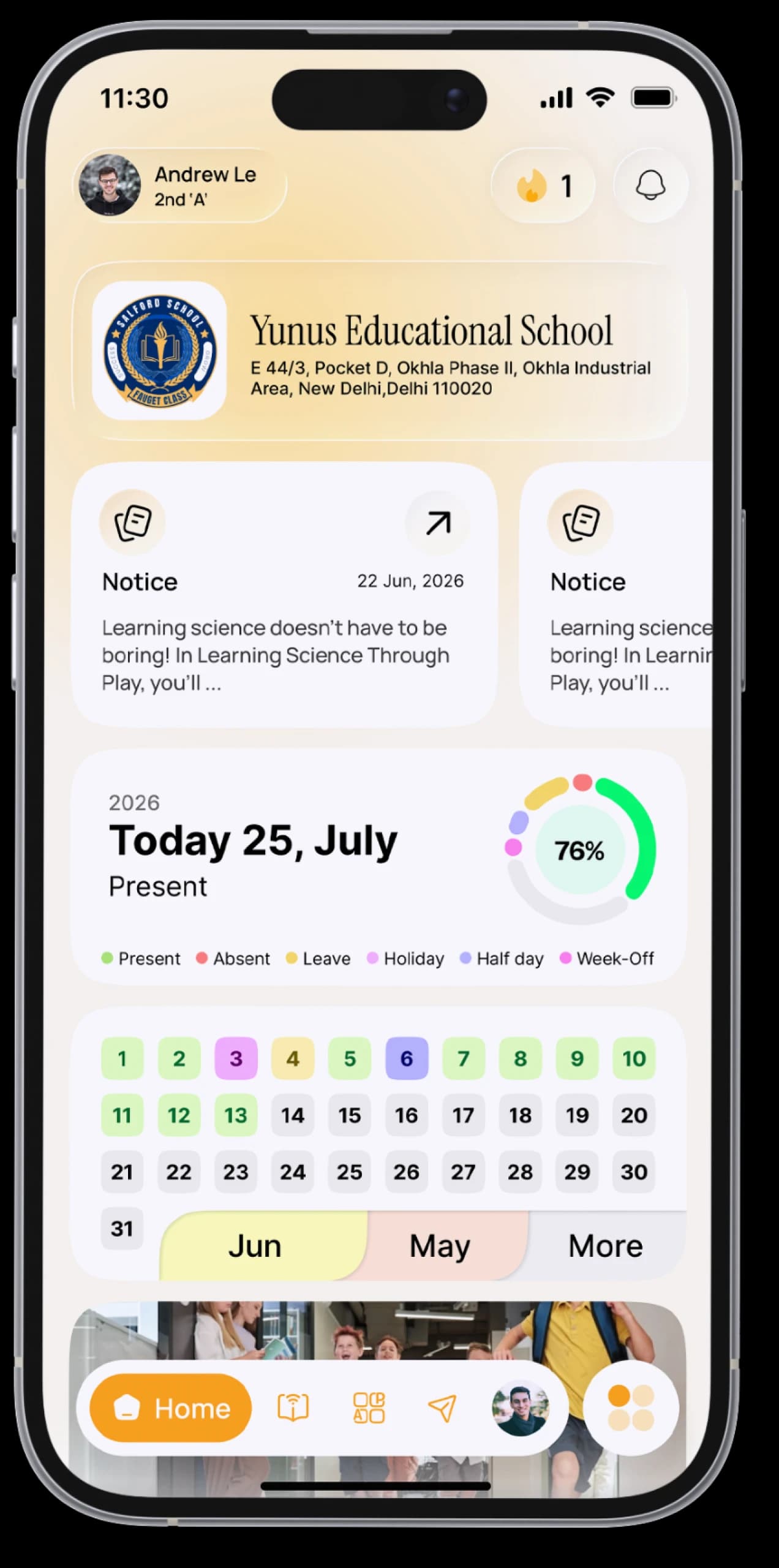
Your SchoolAura Home brings together everything that matters today, from subjects and homework to notices and attendance. Arrange it exactly the way you like.


1 screen
Classes, bag, homework and attendance together
Live
Today's Class shows the period on now, or the next one
Mon–Sat
Check the bag schedule for any day of the week
Yours
Show, hide and reorder the cards on your Home
The everyday problem
Information about your day is everywhere: the diary, the notice board, a friend's message, a slip in your bag. You hear about the test on the morning of the test.
How SchoolAura helps
Home gathers the day's essentials into simple cards you can read in seconds. Tap any card for the full details, and decide which cards you see and in what order.
Everything in one place.
Today's Plan
Your Home greets you with the date and a short plan for the day: your next class, the Daily Quiz and any homework or worksheets set today.
Today's Class
See the period that's on right now, or the next one, with the subject, the teacher and the time.
Daily Bag Schedule
Pick any day from Monday to Saturday and see which subjects to pack. The full week is in Daily Bag Pack.
Daily Assignment
Home work, class work and worksheets in one card, sorted into Today, Tomorrow and This Week.
Attendance at a glance
Today's status, this month's calendar and your Present, Absent and Leave counts, without leaving Home.
Birthdays and Daily Updates
See whose birthday it is and send a wish, and open Daily Updates to look back at any earlier day.
Made for your day.
For students
- See the period on now, or the next one, with the subject, teacher and time
- See today's subjects in the Daily Bag Schedule, so the right books go in your bag
- Spot today's home work, class work and worksheets, the latest notice and your attendance without opening each section
- See whose birthday it is today, and send them a wish
- Catch up on any earlier day with Daily Updates: home work, class work, worksheets, notices, syllabus topics and holidays in one view
- Check the holiday list before you plan anything
- Customise Home: switch cards on or off and move them up or down
For parents
- See the same Home for each of your children, and switch between them from My Kids
- Each child's Home layout is remembered separately
Simple, step by step.
- 1
Open SchoolAura. Your Home shows today's cards.
- 2
Tap a card (Daily Bag Schedule, Daily Assignment, Notice or Attendance) to see the details.
- 3
Tap Customize Home to choose which cards you see and move them up or down, then tap Done.
- 4
Tap Refresh whenever you want the latest.
Right where you'd look.
Your Day at a Glance is built into the SchoolAura app. Here's where you'll find it.
In the app
Home
Today's Plan, Today's Class, Daily Bag Schedule, Daily Assignment and Attendance sit at the top, under Today.
In the app
Home → Updates
Notices, messages, Daily Updates and today's birthdays.
In the app
Menu → Daily Bag Pack
The whole week's subjects, day by day.
Small things, big difference.
Nothing to hunt for
Today's essentials, on one screen.
Yours to arrange
Keep what you use most at the top.
Ready the night before
Know tomorrow's subjects in advance.
Questions, answered.
More ways SchoolAura helps.


Homework & Syllabus
Homework, class work and worksheets with your teacher's files, plus every subject's chapters for the term.
Learn more

Notices & Notifications
Every circular on your Notice Board, every update in your notifications.
Learn more

Attendance & Leave
Check your attendance month by month, and apply for leave right from the app.
Learn moreStart every day knowing what's ahead.
Download SchoolAura and log in with the details your school shared.